Practical Mug Mockup Canva Frames for Designers
If you have ever struggled with aligning curved text or warping graphics to fit a cylindrical surface, the 11oz 12oz 15oz Mug Canva Frame Template is the specific solution you need. This digital asset solves the problem of perspective and distortion that makes DIY mockups look unprofessional. It serves as a bridge between a flat design canvas and a realistic, three-dimensional product representation. For entrepreneurs, content creators, and designers, this template eliminates the guesswork involved in creating product listings, social media previews, or client presentations.
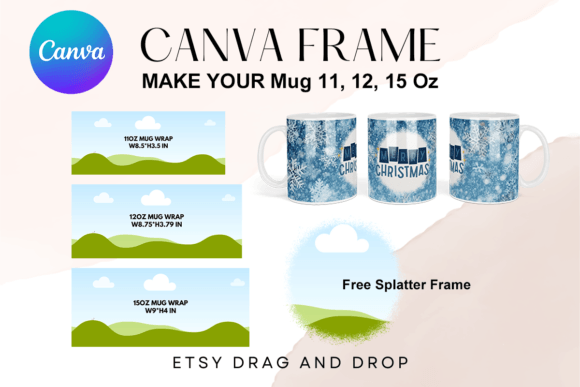
It is crucial to understand the nature of this asset before purchasing. This is a digital file. You will not receive a physical ceramic mug in the mail, nor will you receive decorative props, fake coffee, or styled backgrounds. The package consists of a single PDF file containing a direct link to three custom-made Canva frames. These frames are pre-sized for the industry-standard 11oz, 12oz, and 15oz mugs. The dimensions provided—8.5" x 3.5" for the 11oz, 8.75" x 3.79" for the 12oz, and 9" x 4" for the 15oz—ensure that your final print files or mockup presentations maintain accurate proportions.
Streamlining Workflow with Drag-and-Drop Efficiency
The primary appeal of the 11oz 12oz 15oz Mug Canva Frame Template lies in its accessibility. You do not need expensive software like Adobe Photoshop or complex 3D modeling skills to use it. Because it is built for Canva, the interface is intuitive. You simply open the link, select the frame that matches your product, and use the drag-and-drop functionality to place your design. This is particularly valuable for small business owners who need to turn around product concepts quickly. Instead of spending hours learning curve distortion tools, you can have a polished visual ready in minutes.
Visually, these frames are designed to be minimalists. They feature a transparent layer, which is essential for versatility. Without a locked-in background, you can place the mug frame onto any surface—whether it is a rustic wooden table, a marble countertop, or a solid brand color. This transparency also makes it easy to integrate the mockup into larger marketing collages or website banners without worrying about awkward white boxes around the edges. The "personality" of the asset is purely functional; it is a clean slate waiting for your branding.
Accurate Dimensions for Professional Presentation
Size accuracy is often where free mockups fail. A design that looks perfect on screen might appear stretched or squashed if the template dimensions are off. The 11oz 12oz 15oz Mug Canva Frame Template addresses this with specific sizing. The 11oz frame at 8.5" x 3.5" represents the most common coffee mug size used in print-on-demand services. The 12oz and 15oz frames provide variations for larger "latte" style mugs. These sizes are approximate, as noted in the asset description, but they are close enough to industry standards that you can size them up or down slightly to suit your specific print provider's requirements.
This flexibility allows for creative freedom. If you are designing a wrap-around graphic, the approximate sizing lets you adjust the canvas to ensure the "bleed" areas are covered. For vinyl sublimation, where heat and pressure can cause slight material shrinkage, having a template that allows for minor adjustments is a practical advantage.
Strategic Applications for Brand Identity
Mugs are more than just drinkware; they are mobile billboards. Using the 11oz 12oz 15oz Mug Canva Frame Template allows you to visualize how your brand identity translates to physical merchandise. For graphic designers and brand strategists, this is an invaluable step in the proofing process. You can test how your logo design holds up on a curved surface. Does the sans serif font remain legible? Does the color palette clash with the white ceramic?
Consider the following practical applications for this template:
- Product Listings: Create consistent, high-quality images for Etsy, Shopify, or Amazon listings without hiring a photographer.
- Social Media Graphics: Generate mockups for Instagram or Pinterest to promote seasonal sales or new merchandise drops.
- Client Proposals: Show branding clients exactly how their logo will look on corporate swag or merchandise.
- Gift Prototyping: Hobbyists can design personalized gifts for weddings or birthdays and see the layout before ordering the actual print.
Sublimation and Vinyl Design Considerations
The description notes that these are transparent layers optimized for vinyl sublimation. This is a key technical detail. Sublimation requires high-resolution inputs, but the frame itself is the guide. When you place your artwork into the frame in Canva, you are essentially creating a "flat view" of the curved mug. This helps in visualizing the "safe zone"—the area of the mug that is most visible to the viewer holding the handle.
Unlike static PNG or SVG files, which are fixed images, this editable Canva frame template acts as a dynamic container. You can swap out designs instantly. If you are a content creator launching a new line of mugs with different slogans, you can use the same 11oz 12oz 15oz Mug Canva Frame Template for all of them, simply updating the internal graphic each time. This ensures visual consistency across your entire product catalog.
Evaluating the Asset for Your Needs
When deciding if this asset fits your project, consider your current design stack. If you are heavily reliant on Canva for your social media graphics and web design assets, this template integrates seamlessly into your existing workflow. It avoids the friction of switching between different software ecosystems.
However, it is important to manage expectations regarding the file type. As stated, this is not a PNG or SVG. You cannot download a standalone image file of the mug itself. The value lies in the frame functionality within Canva. If you need a standalone image for a specific software other than Canva, this particular asset would not be the correct choice.
For the price point and convenience, the 11oz 12oz 15oz Mug Canva Frame Template offers significant utility for the modern creative. It streamlines the presentation phase of design, allowing you to focus on the artwork itself. Whether you are a seasoned designer presenting to a corporate client or a hobbyist making a gift for a friend, having a reliable, editable frame ensures your final product looks exactly as you envisioned. The ability to drag, drop, and resize without distortion makes it a staple asset for anyone involved in merchandise creation. By using these frames, you bridge the gap between digital creation and physical production, ensuring that what the customer sees on the screen is what they get in their hands.