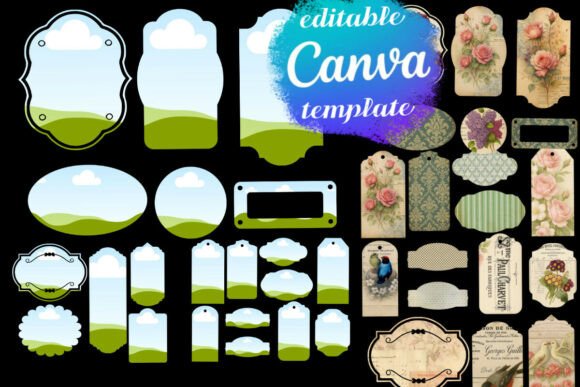
Canva Frames Junk Journal Labels for DIY Projects
If you have ever tried to build a cohesive scrapbook or planner spread, you know the struggle of finding the perfect embellishment. You can spend hours scrolling through stock sites or, worse, trying to cut intricate shapes out of paper by hand. This is where the utility of digital design assets truly shines. Specifically, the Canva Frames Junk Journal Labels set solves a very common problem for creators: how to get professional, vintage-style ephemera without needing advanced graphic design skills. This collection provides a bridge between raw digital design and the tactile feel of handmade paper crafts.
The Aesthetic of Controlled Chaos
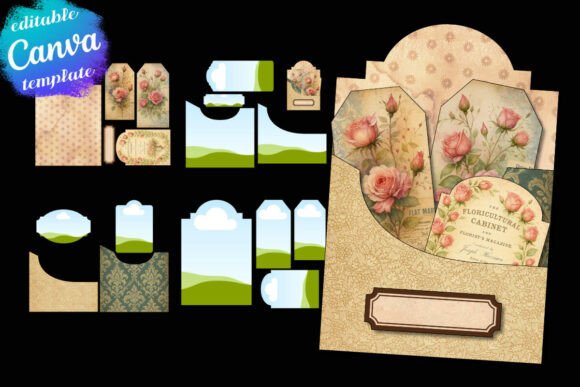
The visual personality of these labels is rooted in vintage nostalgia. We are talking about ornate borders, distressed textures, and serif typography that feels lifted from an old library catalogue or a Victorian shipping manifest. However, unlike a static image file, these are editable Canva templates. This means you get the "vintage" look but with the flexibility of modern typography.
The style is intentionally imperfect in the way that real life is imperfect. In the world of junk journaling, pristine digital edges can look out of place. These frames have character. They mimic the look of die-cuts or rubber stamps. This makes them distinct from the sterile, corporate look of a standard sans serif font. They offer a "lived-in" aesthetic that appeals to hobbyists and small business owners alike who want to inject warmth into their branding. The visual hierarchy here is established through ornamentation rather than size; the frames draw the eye, allowing the text inside to serve as the focal point.
Practical Applications for Designers and Entrepreneurs
When we look at where these assets work best, the applications are surprisingly diverse. For the scrapbooker or planner enthusiast, the answer is obvious: these are perfect for creating focal points on a page. But for the marketer or brand strategist, the value lies in content creation.
Consider the needs of a small business owner creating social media graphics. A standard text post often gets scrolled past. But a post featuring a vintage-style label frame—perhaps holding a customer testimonial or a "Deal of the Day"—stops the scroll. It creates a tactile illusion on a digital screen. This is particularly effective for industries like bakeries, coffee shops, handmade goods, and boutique retail.
Furthermore, these templates are excellent for packaging design. If you are a maker selling physical goods, you often need hang tags or sticker labels. Instead of hiring a designer for every new product variation, you can use these Canva frames to generate print-ready labels on the fly. The high-resolution layout ensures that when you print these on textured cardstock, the result looks professional and intentional.
Integrating Frames into Brand Identity
A strong brand identity is about consistency, but it also needs to be adaptable. These Canva frames act as a unifying design element. If you are a content creator or a blogger, using these specific frames consistently across your blog graphics and Pinterest pins creates instant recognition.
The psychology behind this is simple: humans are pattern seekers. When your audience sees that specific ornate frame shape, they associate it with your content. It becomes a visual anchor. This is a subtle form of logo design thinking applied to content marketing. You aren't just using a generic box; you are using a stylistic signature.
For digital planners, the integration is seamless. Because these are delivered as a Canva template link, you can customize the colors to match your existing typeface palette. If your brand uses a specific shade of sage green or dusty rose, you can edit the frame colors in seconds. This ensures that your printable tags and journal pages don't look like they were bought from a generic bin, but rather curated specifically for your aesthetic.
Technical Usability and Workflow
One of the biggest hurdles in using premium design assets is the learning curve. You might download a complex vector file only to realize you need Adobe Illustrator to open it. The genius of the Canva Frames Junk Journal Labels is the delivery method.
By utilizing the Canva ecosystem—even the free version—this asset set removes technical barriers. You don't need to be a typographer to make these work. The user experience is designed for "DIY labels" and quick iteration.
However, there are practical considerations to keep in mind. When you insert text into these frames, readability is paramount. Because the frames are "ornate" and visually busy, the text inside needs to breathe. I recommend using a clean, legible sans serif font or a simple serif font for the body text inside the labels. Avoid using a script font or a highly stylized handwritten font for the details, as the frame's decoration might compete with the text, making it hard to read at smaller sizes.
Choosing the Right Asset for the Job
Not every project requires a vintage aesthetic. If you are designing a high-tech app interface or a minimalist web design for a SaaS company, these frames likely won't fit the brief. They are designed for projects that require texture, personality, and a human touch.
When evaluating if this set fits your project, ask yourself: Does my audience value craftsmanship? Is the "perfect" look actually less effective than a "charming" look?
Here is how to get the most out of these templates:
- Customize the colors: Don't stick to the default sepia or black. Try matching the frame to your brand's primary color palette for a more modern take on vintage style.
- Layer your elements: Use these frames as a base layer. Add stickers, washi tape textures, or your own logo design elements on top to create a collage effect.
- Check the print settings: Since these are "print-ready," ensure your printer settings match the high-resolution output. If you are printing on a home inkjet, use the "Best Quality" setting to capture the fine details of the ornate borders.
Ultimately, the Canva Frames Junk Journal Labels