Designing Vintage Ephemera: A Calendar Card Junk Journal Template Guide
The Anatomy of a Versatile Digital Toolkit
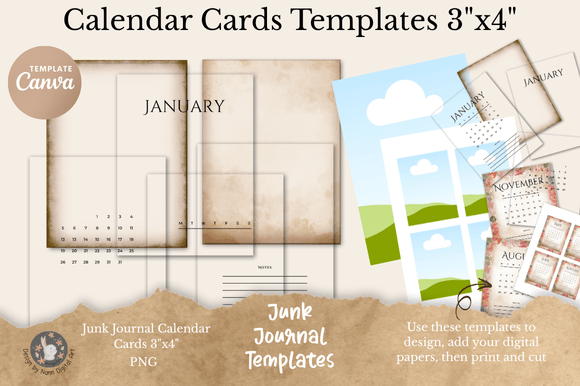
When you first open the Calendar Card Junk Journal CanvaTemplate, you aren't just seeing a collection of digital files; you are looking at a complete ecosystem for organizing time with a vintage aesthetic. This isn't a static image file where you are stuck with one specific year or a rigid color scheme. It is a modular construction kit designed for makers who value both creativity and utility. The core of this set lies in its separation of elements. Instead of a flat calendar, you get distinct layers: 12 Month Headings, interchangeable Day Headings (allowing for both Monday and Sunday start layouts), and specialized Date Blocks that accommodate the 28, 29, 30, and 31-day variances of our calendar year. This modular approach is the secret to longevity; you can use this template set year after year without buying a new digital asset.
The visual personality of these templates leans heavily into the "junk journal" aesthetic. This means the design language is rooted in texture, nostalgia, and a sense of history. You will find that the included Vintage Border Templates and Inset Background Overlays provide that essential tactile look, mimicking aged paper or distressed ink. However, because the source files are high-resolution 300dpi PNGs and a master PSD file, the quality remains crisp even when printed. The style balances the raw, organic feel of handmade ephemera with the precision required for professional graphic design. It is a blend of the imperfect and the intentional, making it ideal for projects that need to feel personal yet polished.
Strategic Applications: From Branding to Personal Projects
Understanding where to deploy the Calendar Card Junk Journal CanvaTemplate requires looking beyond the obvious scrapbooking applications. For designers and brand strategists, these templates offer a unique opportunity to create tangible touchpoints. In an era where digital fatigue is real, physical mailers or inserts carry significant weight. Imagine a small business owner sending out a monthly planner card with their orders. Using these 3x4 inch templates, they can design a branded "Calendar of Care" that fits perfectly into a shipping box, reinforcing their brand identity through a useful, vintage-styled artifact. This moves the design asset from a hobbyist tool to a legitimate component of a marketing strategy.
For content creators and bloggers, particularly those in the lifestyle, productivity, or DIY niches, the utility is even more direct. The templates are perfectly sized for standard index card holders or traveler's notebooks, which are popular in the planning community. You can use the editable features in Canva to create monthly content calendars that double as decorative elements for "Plan With Me" videos. The visual hierarchy established by the distinct Month Headings and clean Date Blocks ensures that while the card looks like vintage ephemera, it functions as a modern productivity tool. It bridges the gap between aesthetic social media content and actual time management.
Furthermore, the versatility of the file formats—specifically the inclusion of a PSD file and Canva compatibility—makes this accessible to a wide range of technical skill levels. If you are a photographer or a digital artist, you can use the PNG overlays to add a layer of temporal context to your portfolio presentations. If you are a teacher or a parent, you can print these cards to create interactive learning aids for teaching children the days of the week and months of the year. The "Notes" template adds another dimension, allowing for to-do lists, journaling prompts, or gratitude logs that match the calendar aesthetic perfectly.
Maximizing Value: Practical Design and Production Tips
To get the most out of the Calendar Card Junk Journal CanvaTemplate, you need to think like a printmaker. The 300dpi resolution is your best friend here, but paper choice dictates the final result. For a true junk journal feel, consider printing on kraft cardstock or matte presentation paper. If you want the vintage borders to pop, a slightly textured paper stock can simulate the feel of old stationery. When using the PSD file in Photoshop, take advantage of the layer structure to adjust the contrast or sepia tones of the background overlays to match your specific project's color palette.
One of the most powerful features of this set is the flexibility of the day and date blocks. In professional editorial design, consistency is key, but so is adaptability. Because the day headings are provided as separate assets, you can easily switch between a "Mon-Sun" layout common in European planners and a "Sun-Sat" layout common in the US market. This makes the template set commercially viable for designers creating planners for a global audience. Do not overlook the "Date Blocks" containing 28, 29, 30, and 31 days. A common mistake in calendar design is forgetting that February varies. This template set solves that problem structurally, ensuring your designs are always accurate.
When editing in Canva, the process is streamlined for efficiency. You can upload the PNG elements and use Canva’s alignment tools to snap the headers and date blocks into place. This is particularly useful for entrepreneurs who need to produce high volumes of content without spending hours on complex layout software. The ability to edit the text directly allows you to localize the cards for different languages or add specific event reminders (e.g., "Market Day," "Payroll") directly onto the vintage card design. This transforms a generic printable into a bespoke planning system tailored to your specific workflow.
Ultimately, the value of this template set lies in its ability to merge the charm of the past with the efficiency of the present. It is not just a static image; it is a dynamic design asset. Whether you are building a brand, organizing a creative business, or simply beautifying your personal planner, the Calendar Card Junk Journal CanvaTemplate provides the foundational geometry and aesthetic texture to do so effectively. It respects the user's time by being easy to edit while respecting the craft tradition by maintaining high-quality, vintage-inspired visuals.