Design Custom Treats: Canva Chocolate Bar Wrapper Templates
There is something undeniably personal about handing someone a chocolate bar that you have customized yourself. Whether it is for a wedding favor, a corporate event, or a holiday gift, the wrapper is just as important as the candy inside. For designers, small business owners, and DIY enthusiasts, the challenge has always been getting the dimensions exactly right without wasting expensive paper or ink. This is where the Chocolate Bar Wrapper Template - Canva resource becomes a game-changer. It eliminates the guesswork of measuring and cutting, allowing you to focus entirely on the creative aspect of packaging design.
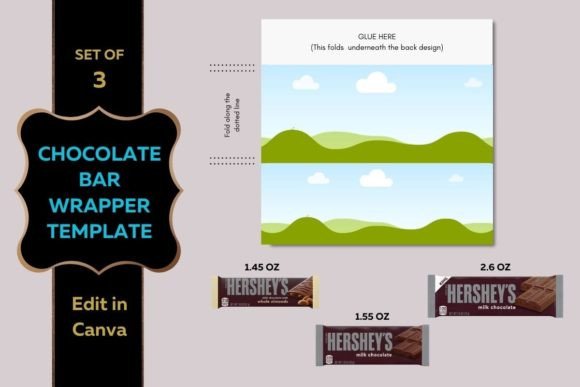
This digital asset is specifically formatted to fit standard 8.5x11-inch paper, making it accessible for anyone with a home printer or a local print shop. However, the true power lies in its versatility across different candy sizes. The template set includes distinct layouts for the 1.45 oz, 1.55 oz, and 2.60 oz chocolate bars. This variety ensures that whether you are wrapping a classic snack size or a larger king-size bar, your design will fit perfectly. It is an essential tool for anyone looking to create professional-grade design assets without needing advanced technical skills in software like Adobe Illustrator.
Visual Hierarchy and Layout Strategy
When you open the Chocolate Bar Wrapper Template - Canva, you are greeted with a clean, structured interface. The visual characteristics of the template are intentionally neutral. It provides outlined zones for the front face, the back nutritional information, and the side flaps. This "blank canvas" personality is vital. It acts as a wireframe, allowing your brand identity to take center stage. The style is utilitarian yet modern, designed to guide your eye naturally from the center of the bar outward to the edges where you will apply adhesive.
Understanding the visual hierarchy is crucial for effective editorial design in this small format. Because the surface area is limited, you cannot afford clutter. The template helps you visualize the "safe zones" for your text and graphics. For a small business owner creating product samples, this structure ensures that your logo is not accidentally cut off during the trimming process. The overall appeal of this system is its ability to make amateur designs look polished. By adhering to the grid provided, you naturally create a balanced layout that mimics the professional packaging design found on store shelves.
Choosing the Right Typography for Your Wrapper
Typography is the voice of your design, and on a chocolate wrapper, it needs to speak loudly and clearly. Selecting a premium font or a creative font can elevate a simple DIY project into a luxury gift. When working within Canva, you have access to thousands of typefaces, but not all are suitable for this specific application. For the main title of your chocolate bar, a bold display font or a playful handwritten font often works best. These styles grab attention immediately, which is the primary goal of packaging design.
However, readability is paramount. If you choose a complex script font for the flavor description, ensure it is legible at small sizes. A good rule of thumb is to pair a decorative header with a clean sans serif font for the details. This font pairing creates a contrast that guides the reader's eye. For example, a thick, retro display font for "Mint Chocolate" paired with a modern, light sans serif font for "Handcrafted Artisan Batch" creates a sophisticated look. This approach influences brand perception, making the product feel high-end even if it is a standard grocery store candy bar.
Adapting to Different Bar Sizes
The transition from the 1.45 oz template to the 2.60 oz template requires a shift in design thinking. The smaller wrappers, such as the 1.45 oz and 1.55 oz sizes, have very limited horizontal space. Here, vertical stacking of text is often necessary. You might use a tall, condensed sans serif font to maximize space. These smaller bars are excellent for place settings or quick giveaways, so the design needs to be impactful at a glance.
The 2.60 oz wrapper offers a wider canvas, more akin to a billboard. This size allows for more elaborate modern typography arrangements. You can utilize wider tracking (letter spacing) or incorporate larger graphical elements alongside your text. For entrepreneurs using these for marketing materials, the larger bar provides enough room for a QR code or a website URL without making the design feel crowded. Whether you are using a serif font for a classic look or a geometric sans serif font for a tech startup vibe, the template ensures your proportions remain correct.
Practical Applications for Creators and Businesses
The utility of the Chocolate Bar Wrapper Template - Canva extends far beyond birthday parties. For content creators and bloggers, these customized bars make for excellent props in food photography or "unboxing" style content. The ability to edit the wrapper digitally means you can mock up concepts before printing. This is a practical workflow for designers presenting concepts to clients in the confectionery or gifting industries.
For marketers and entrepreneurs, these wrappers serve as tangible business cards. Imagine handing a potential client a chocolate bar wrapped in your brand identity colors, featuring your logo, and a clever tagline. It is a memorable tactile experience that a standard business card cannot replicate. The template facilitates this by handling the technical formatting, allowing you to focus on the visual hierarchy of your marketing message.
Design Assets and Brand Consistency
Consistency is the cornerstone of professional design. When creating a batch of favors or promotional items, every wrapper must look identical. The Chocolate Bar Wrapper Template - Canva ensures this uniformity. By using the same digital file for every print, you eliminate the variances that come with hand-measuring. This is particularly important for small business owners who need to maintain a consistent brand identity across all customer touchpoints.
Consider the color palette. If your brand uses a specific shade of navy blue, you can apply that exact hex code to the template background. You can also upload custom textures or patterns to the Canva file. This level of customization allows you to create a commercial font style presentation—meaning it looks ready for retail—using free or low-cost tools. The template acts as the structural skeleton, while your creativity provides the flesh and personality.
Printing and Production Tips
Once your design is finalized in Canva, the production phase begins. Since the template is sized for 8.5x11-inch paper, you have a wide range of paper stock options. Standard copy paper is often too thin and allows the chocolate foil to show through. Instead, opt for a matte or glossy cardstock, typically between 80lb and 100lb. This weight provides a sturdy feel that mimics professional retail packaging.
When printing, ensure your printer settings are adjusted for "High Quality" or "Best" to capture the details of your typeface and graphics. If you are using a serif font with fine details, high-resolution printing is non-negotiable. After printing, use a paper cutter or craft knife for clean edges. The Chocolate Bar Wrapper Template - Canva usually includes trim marks or fold lines to guide you. Adhering the wrapper can be done with simple glue dots or double-sided tape for a seamless finish.
In conclusion, the Chocolate Bar Wrapper Template - Canva is more than just a digital file; it is a bridge between a simple candy bar and a personalized piece of art. By leveraging the structure of the template and applying solid design principles—such as thoughtful font pairing and clear visual hierarchy—you can produce professional-quality results. Whether you are a crafter making gifts for loved ones or a marketer building a brand identity