Customize Your Planner with Canva Editable Stickers
For the creative professional, the entrepreneur, or the dedicated hobbyist, a planner is rarely just a calendar. It is a command center, a mood board, and a personal sanctuary. The challenge, however, lies in finding stationery that truly reflects your brand or personal aesthetic without costing a fortune in custom printing. This is where the utility of design assets like the Canva Editable Planner Sticker becomes undeniable. It bridges the gap between professional graphic design and personal organization, offering a flexible solution for those who value both form and function.
The Anatomy of a Customizable Design Asset
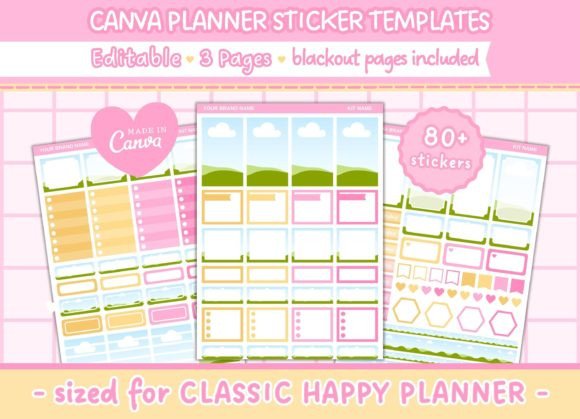
At its core, this product is a digital template designed for the popular Classic Happy Planner system, but its potential extends far beyond the pages of a spiral-bound book. The package consists of three pages, each sized at 6.75 x 9.25 inches, which is the standard insert dimension for the "Big" or "Classic" disc-bound systems. The visual personality of these stickers is defined by their blank canvas nature. Because they are editable in Canva, the style is entirely up to you. You can lean into modern typography with clean sans serif font choices for a corporate look, or apply a handwritten font for a cozy, artisanal vibe.
The appeal lies in the structural integrity of the layout. Each page features full-size boxes measuring 1.5" x 2.5". These dimensions are specifically engineered to fit the standard vertical layout of popular planners. The "blackout" pages included are a crucial feature for crafters and small business owners. These high-contrast pages are optimized for use with electronic cutting machines like Cricut or Silhouette. By using a blackout image, your machine can precisely scan the edges of the stickers and cut them out, saving you hours of tedious hand-cutting.
Strategic Applications for Brand and Business
While the immediate application seems to be personal time management, the Canva Editable Planner Sticker is a powerful tool for brand identity and marketing. Consider the small business owner who attends trade shows or networking events. Instead of handing out generic business cards, you can design a set of branded stickers. By utilizing the editable text fields, you can insert your logo, your tagline, or a QR code leading to your portfolio. Printing these on sticker paper turns a functional planner item into a tactile marketing asset that clients will actually keep and use.
For content creators and bloggers, these templates solve the perennial problem of content batching. You can customize the boxes to represent specific content pillars—video, blog, social, and email. By color-coding the stickers using Canva’s color picker tool to match your brand palette, you create a visual hierarchy that allows you to see your content strategy at a glance. This is not just decoration; it is a functional design asset that aids in project management.
Visual Hierarchy and Readability in Layout
When customizing these stickers, the principles of visual hierarchy are paramount. Because the real estate is limited to 1.5" x 2.5", you cannot simply cram information onto the sticker. You must prioritize. A common mistake is using a script font or a highly decorative display font for the body text. While these fonts have high personality, they suffer from readability issues at small sizes.
A practical recommendation is to pair a bold display font for the header of the sticker—such as "Meeting" or "Deadline"—with a legible sans serif font for any details. This creates a clear distinction between the category and the specific task. If you are designing for a client or selling these stickers, ensure that the contrast between the text and the background is sufficient. A soft pastel background with white text might look trendy on screen, but it will fail the readability test once printed on matte paper.
From Digital Template to Physical Product
The workflow for the Canva Editable Planner Sticker is designed for accessibility. You do not need to be an expert in Adobe Illustrator to produce professional results. Canva acts as the bridge. Once you have edited the text, changed the background textures, or added your own photography, the next step is the physical production.
For those looking to sell these as a commercial product, the quality of your print media matters as much as the premium font you choose. Standard copy paper will not suffice; you need a heavier cardstock or dedicated printable vinyl. The 1.5" x 2.5" dimension is also ideal for "tip-in" pages in journals. You can print the designs, cut them using the blackout guides, and paste them directly into a sketchbook or bullet journal to create a mixed-media effect.
Choosing the Right Typography for Your Stickers
Typography is the voice of your design. When selecting fonts within the Canva editor to place on these stickers, consider the psychological impact. A serif font conveys tradition, authority, and reliability—perfect for financial planning or academic scheduling. In contrast, a geometric sans serif font feels approachable, clean, and modern, suitable for fitness tracking or lifestyle blogging.
Do not underestimate the power of font pairing. If you are creating a set of stickers to sell, consistency is key. Choose one heading font and one body font and stick to them across all three pages. This consistency builds brand recognition. If you are using a creative font with a lot of swashes or ligatures, always test print a sample. Sometimes, digital flourishes can overlap or look cluttered when reduced to the size of a planner box.
Practical Guide to Evaluation and Licensing
Before investing time in customization, evaluate the project fit. The 6.75" x 9.25" size is specific. If you are using a different planner system, such as a traveler's notebook or a standard A5 binder, you will need to adjust the canvas size in Canva. However, the modular nature of the 1.5" x 2.5" boxes makes them versatile; they can be rearranged on a larger canvas or cropped down for smaller inserts.
Finally, a note on commercial licensing. If you intend to use these templates to create products for sale—whether as printed stickers on Etsy or digital downloads—always verify the license of the original template. Most templates sold for commercial use allow you to sell the end product (the printed sticker), but they rarely allow you to resell the editable digital source file. Understanding this distinction protects your business and respects the work of the original graphic design creator.
The Canva Editable Planner Sticker is more than just a digital download; it is a toolkit for organization and creativity. By leveraging the editable features, focusing on strong typography, and utilizing the blackout cutting guides, you can transform a generic planner into a bespoke organizational system that drives productivity and reflects your unique style.