Create Authentic 90s Vibes with a Retro Rap Tee Canva Template
Understanding the Visual DNA of the Bootleg Tee
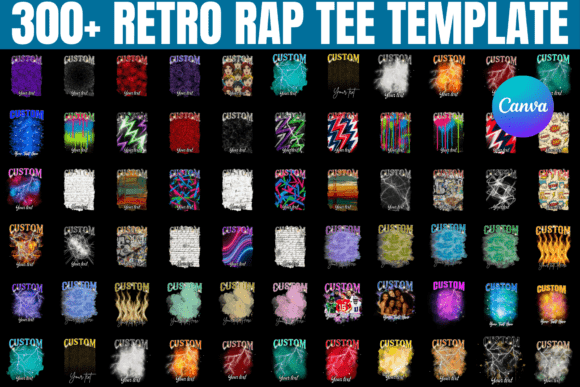
There is a specific aesthetic that defines the golden era of hip-hop merchandise, often referred to as the "bootleg" style. If you are looking to capture that energy, the Retro 90s Rap Tee Canva Template is your toolkit for instant nostalgia. This isn't just a graphic; it is a design system that mimics the raw, unpolished, yet highly charismatic look of 1990s streetwear. We are talking about high-contrast halftone dots, distressed textures that look like they have been through a few washes, and bold, aggressive typography that demands attention. The visual personality of this template bundle is loud, expressive, and unapologetically retro.
The appeal lies in its imperfection. Modern design often strives for pixel-perfect vectorization, but the 90s rap style thrives on grit. This Canva template captures that by using overlay effects and vintage color palettes—think washed-out blacks, faded neons, and sepia tones. It feels authentic to the era of VHS tapes and boomboxes. For designers and entrepreneurs, this means you don't have to spend hours trying to recreate that "lived-in" look from scratch. The heavy lifting is done; you simply need to inject your own subject matter into the framework.
Practical Applications: Beyond the Birthday Party
While this bundle is marketed heavily for birthday gifts and custom photo tees, the versatility of the Retro 90s Rap Tee Canva Template extends far beyond personal celebrations. If you run a print-on-demand business or a small clothing brand, this style is a proven seller. The "old school" aesthetic is trending heavily in youth culture and streetwear circles. You can use these templates to create limited-edition merchandise drops that resonate with an audience looking for vintage flair without the vintage price tag.
Consider the following use cases for this design asset:
- Brand Identity & Marketing: If your brand voice is edgy, urban, or nostalgic, use these templates to create social media graphics that stand out in a polished feed. The rough texture and bold fonts create a stopping power that clean, modern sans serif fonts sometimes lack.
- Event Promotion: Hosting a 90s themed night, a throwback concert, or a reunion? These templates work perfectly for digital flyers and posters. The layout is already optimized for hierarchy, placing the central image (the "face") at the top and the event details below in a classic vertical stack.
- Editorial Design: If you are a blogger or publisher writing about music history, pop culture, or streetwear, you can adapt these templates to create featured images or chapter headers that instantly signal the topic to your readers.
Mastering the Edit: A Designer’s Guide to Customization
The biggest selling point here is the "Easy Canva Editable" nature of the product. However, "easy" doesn't mean you shouldn't apply design principles. To get the most out of this creative font and layout bundle, you need to understand a bit about visual hierarchy. The 90s rap tee style is dense. It packs a lot of information into a small space.
When you open the Canva template, resist the urge to change every color immediately. Start with the photo. The success of this design relies on high-contrast portraits. A flat, evenly lit photo often gets lost in the halftone effects typical of this style. Choose images with strong shadows and distinct features. Once the image is placed, look at the typography. These templates usually utilize a mix of display fonts and script fonts. Ensure your custom text is legible against the busy background. If the background image is dark, your text needs to be bright, or vice versa. Don't be afraid to use the "Distress" or "Grain" filters available in Canva to blend your new text into the existing vintage texture, ensuring the font pairing feels cohesive rather than pasted on.
Technical Considerations for Print and Digital
When moving from the screen to the physical product, the Retro 90s Rap Tee Canva Template requires some technical foresight. If you are printing on transfer paper or using Direct-to-Garment (DTG) printing, the colors you see on your monitor might not translate perfectly to cotton. The 90s aesthetic actually benefits from this slight shift, as it enhances the vintage feel, but you should always order a sample first.
For digital use, such as web design or social media graphics, pay attention to file size. These designs are detailed. Exporting at 300 DPI is overkill for Instagram; it will just slow down load times. Stick to standard web resolutions. However, if you are using this for packaging design or high-quality editorial design print, export as a PDF (Print) to ensure the premium font details and the halftone dots remain crisp. The bundle includes 300 free and pro elements, so be mindful of copyright licensing if you plan to sell these designs commercially. Always double-check that the specific stock photo or graphic element you are using is cleared for commercial use under the Canva licensing agreement.
Ultimately, this template bundle is a bridge between modern convenience and retro style. It allows you to leverage the power of 90s nostalgia to create compelling brand identity pieces, merchandise, and personal gifts. By treating the template as a starting point rather than a finished product, you can produce professional-grade designs that look like they came straight out of a vintage print shop. Whether you are a small business owner launching a merch line or a crafter making a one-of-a-kind gift, the tools are now in your hands to make it look authentic.
Recreate 90s Hip-Hop Magic with a Canva Template Bundle
The Anatomy of a Classic Bootleg Tee
There’s a raw, unmistakable energy to 1990s rap merchandise. It wasn’t about polished corporate graphics; it was about street-level expression, often produced quickly and with bold, unapologetic flair. A quality Retro 90s Rap Tee Canva Template captures this specific visual language. Think of the high-contrast, halftone dot portraits, the distressed textures that mimic well-worn fabric, and the aggressive, stacked typography. This isn’t a sleek, modern design—it’s a deliberate embrace of the “bootleg” aesthetic, characterized by its layered compositions and vintage color palettes of faded blacks, golds, and reds. The personality is nostalgic, confident, and deeply rooted in pop culture history.
The true appeal of this design asset lies in its ability to instantly transport a viewer. It doesn’t just look old; it feels authentic. The included creative font selections and pre-built layouts handle the heavy lifting of visual hierarchy, ensuring your subject—the face or photo—remains the focal point while surrounding text and graphics frame it with period-appropriate flair. For anyone working in branding or content creation, this template is a shortcut to a powerful, recognizable style that resonates with a specific demographic.
Strategic Uses: From Personal Projects to Commercial Brands
While perfect for a birthday tee or graduation gift, the utility of this Canva template bundle extends far into professional realms. The 90s rap aesthetic is a potent tool in brand identity and marketing, especially for brands aiming for an urban, nostalgic, or counter-culture edge.
- Apparel & Print-on-Demand: This is the most direct application. Entrepreneurs can use the templates to rapidly prototype and launch niche clothing lines targeting vintage hip-hop enthusiasts. The easy-to-edit nature means you can test multiple designs quickly.
- Social Media & Digital Marketing: Use the style for standout social media graphics. A concert promoter, music blogger, or retro gaming channel can use these templates to create eye-catching posts, stories, and profile banners that cut through the noise of a generic feed.
- Event Branding & Packaging: Think beyond the shirt. The visual language works for event flyers, album art mockups, podcast cover art, or even packaging design for products like specialty hot sauces, craft beers, or vinyl records that want to channel a rebellious spirit.
The key is matching the style to your project’s personality. A financial advisor’s website might find it jarring, but a streetwear brand, a music production studio, or a vintage record store will find it perfectly aligned with their brand identity.
Design Principles at Work: Hierarchy, Texture, and Pairing
Using a pre-built template effectively requires understanding the design choices baked into it. This bundle typically employs a clear visual hierarchy. The central portrait is the star, often treated with a high-contrast filter. Supporting text—like a name, title, or year—uses bold, condensed display fonts that mimic classic collegiate or graffiti lettering. These are often paired with a secondary script font or a simpler sans serif font for smaller details, creating a balanced yet dynamic composition.
Texture is non-negotiable for authenticity. The templates include grunge overlays, halftone patterns, and worn edges. When you add your own photo, consider applying a slight grain or adjusting the levels to increase contrast so it integrates seamlessly. Don’t fight the texture; use it to add character. For font pairing, the templates provide a starting point. If you customize further, maintain the contrast: pair a heavy, impactful header font with a cleaner, more legible body font. Avoid adding overly ornate or modern fonts that would clash with the vintage vibe.
Customization Without Compromising Authenticity
The bundle’s promise of being “easy to edit in Canva” is its greatest strength, but thoughtful customization separates a generic result from a standout one. Here’s a practical approach:
- Photo Selection is Critical: The design craves high-contrast portraits. A flat, evenly lit selfie often looks out of place. Choose photos with strong directional light, clear shadows, and expressive features. Black and white or heavily desaturated photos often work best.
- Color Palette Harmony: While you can change colors, stick to a limited, vintage-inspired palette. Muted tones, sepia, or classic black-and-white will always feel more authentic than bright, modern neons. Use Canva’s color picker to sample colors directly from the existing design elements for consistency.
- Text Refinement: Keep text concise. The 90s bootleg style is impactful but not designed for long paragraphs. Use it for names, dates, slogans, or short titles. Ensure any added text uses a font from the bundle or one that stylistically aligns (e.g., a blocky sans serif).
- Leverage the Assets: The included 300 design elements are a goldmine. Use them to add stars, banners, retro shapes, or additional texture layers. Don’t overcrowd the design, but use these assets to fill negative space authentically.
From Canva Canvas to Final Product: Technical Considerations
Your final step is exporting a file that works for your medium. For digital use (social media, web), export as a PNG with a transparent background if needed, or a high-quality JPG. For print, the process is more nuanced. If you’re using a print-on-demand service or a local printer, you’ll likely need a high-resolution PDF or PNG. In Canva, set your export to PDF Print and check the “Flatten PDF” option if available to preserve textures.
A crucial note on licensing: while the Canva template itself is licensed for use, the included premium font and pro design elements have specific terms. If you plan to sell the final product (e.g., on a t-shirt), you must ensure every asset is cleared for commercial use. Canva’s licensing can be nuanced, so review the terms for any element marked “Pro.” This due diligence is part of professional editorial design and merchandise production.
Ultimately, the Retro 90s Rap Tee Canva Template is more than a novelty item. It’s a versatile design asset